Built for Microsoft 365

Quiet vigilance
for every message

Sentura watches every email sent in your name — catching impostors, fixing what's weak, and keeping your domain trusted.

No signup  ·  Runs in your browser
See how it works →
Classifies senders from
Microsoft 365 SendGrid Mailchimp HubSpot Zendesk DocuSign Proofpoint Mimecast + dozens more
How it works

From blind to protected in three steps

No agents. No mailbox. No MX changes. Publish one DNS record per domain and Sentura does the rest.

1

Monitor

Publish your domain's Sentura reporting address (we generate it — [email protected]) as your DMARC rua= record. Reports flow straight to Sentura — no mailbox, no forwarding.

2

Classify

Every sender is identified against a global provider library and corroborated by DKIM signatures, reverse-DNS, and cross-tenant intelligence — so classifications hold up even when an IP catalog is stale. Unknown sources are flagged for review.

3

Enforce

Once every sender is classified, Sentura gives you a clear readiness score and guides you safely from p=none to p=quarantine to p=reject.

Everything you need.
Nothing you don't.

The big DMARC platforms are built for Fortune 500 teams with dedicated security engineers. Sentura is built for the IT admin managing everything.

Direct report delivery

Publish your per-domain Sentura address and reports arrive automatically — no mailbox, no forwarding rules, no shared credentials. (Microsoft Graph mailbox polling remains available as a legacy option.)

Automatic sender classification

Every source IP matched against a global provider library. Microsoft 365, SendGrid, Mailchimp — identified by name, not just IP address. Unknown senders flagged immediately.

Enforcement readiness scoring

A live readiness score per domain. Know exactly what's blocking you from p=reject — and get a clear signal when it's safe to tighten policy.

Spoofing detection and alerts

New unknown senders, failure spikes, and previously passing senders that start failing — all surfaced immediately with actionable alerts.

Multi-domain dashboard

All your domains in one view. SPF, DKIM, and DMARC health checked live. Sender inventory, trend charts, and failure drill-down — no switching between tools.

Managed records, done with you

On the Managed plan, Sentura hosts your DMARC, flattened SPF, and MTA-STS in our own zone and keeps them current. You point one delegation record at us and confirm every change — we never write your DNS.

More included. Transparent pricing.
No add-ons. No surprises.

The big platforms gate the guided journey behind add-ons or "contact sales" pricing. Every Sentura plan includes the full check stack and the guided journey — flat pricing, no per-domain meter, no add-ons.
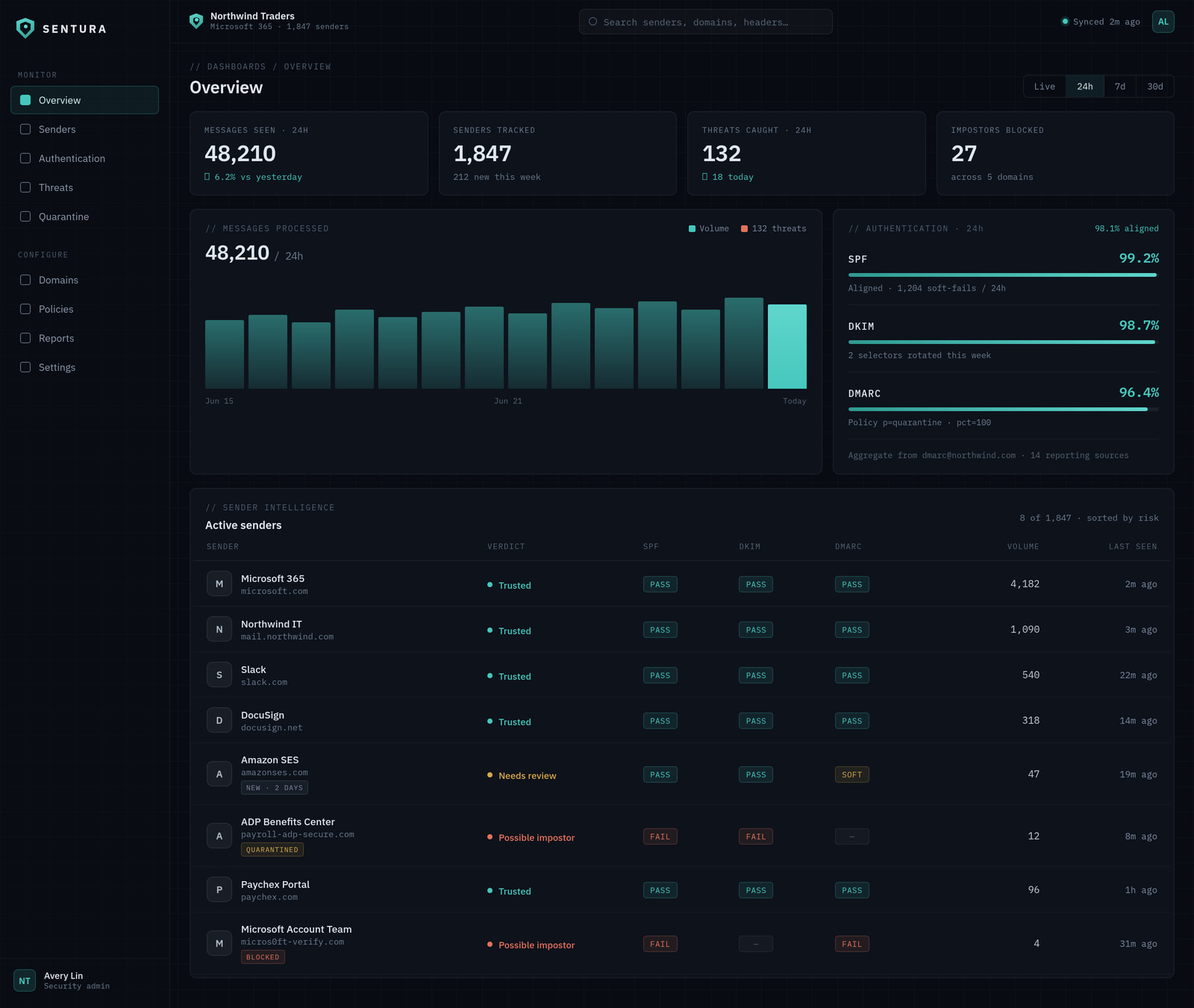
Sentura dashboard — multi-domain DMARC overview
Feature Sentura Provider A Provider B Provider C
Monitoring & reports✓ FreePaid ($9–$36/mo)PaidPaid
Flat, transparent public pricingContact salesVolume-basedPartial
No DNS migration (agnostic)Locked to their DNS
Named-sender verdicts ("Possible impersonator")Raw reportsAdd-on
Guided path to p=reject (gates + confirm-before-change)Report onlyAdd-onHigher tier
Managed records — hosted DMARC + flattened SPF + MTA-STS✓ ManagedAdd-onContact sales
Built for Microsoft 365 (Entra & Google sign-in, Graph)GenericGenericGeneric
Deeper check stack — SPF · DKIM · DMARC · MTA-STS · TLS-RPT · BIMI · DNSSECPartialPartial
Deterministic — no AI in your security decisionsAI-assistedAI-assisted
White-label / multi-tenant✓ via MSP (talk to us)Enterprise onlyPaid add-on

Most DMARC tools stop at "here's a report."
We don't.

The cheap plans you'll see ($9–$36/mo) show you the problem. Sentura fixes it and keeps it fixed — without breaking your mail. Monitoring is free; you only pay when you want us to manage it.

Monitoring · most tools

$9/mo gets you a dashboard and a pile of XML you still fix by hand. You're still the one doing the work.

Managed · Sentura

$29/mo gets us doing it — guided, with you confirming every change. Monitoring is free either way.

Monitoring is free No DNS migration — agnostic No setup fee Flat — no per-domain meter Deterministic — no AI in your security decisions
Free
$0/mo
Visibility for any organisation — see exactly who's sending as you.
Monitoring & reports — others charge $9–$36/mo for this.
LiveAgnostic DMARC monitoring — no need to move your DNS to us
LiveNamed senders, in plain English — every source classified Legitimate / Forwarded / Possible impersonator / Unknown
LiveLive readiness score — see which gates block p=reject, and why
LiveSpoofing & failure alerts
LiveMulti-domain dashboard + sender inventory & trend charts
LiveAll 9 free tools — no signup
LiveFull report history included
Check your domain — free Start monitoring →
Coming soon
Managed Pro
$49/mo at launch
Growing / multi-site orgs — managed, plus the threat-intelligence layer.

Everything in Managed, plus the threat-intelligence layer. Join the waitlist and we'll tell you the moment it's live.

SoonThreat-intelligence enrichment — known-bad-IP corroboration on the senders impersonating you, surfaced in both your live verdicts and your reports
SoonDeeper reporting — downloadable, scheduled & exportable posture reports
SoonAudit export
SoonMore scope for larger / multi-site footprints
Join the waitlist
MSP / White-label
Talk to us
Resell email-authentication management under your own brand.
LiveWhite-label reports — your consultant / brand name on the deliverable
SoonMulti-tenant client fleet — all client domains in one pane
Per-tenant wholesale pricing
Dedicated support
Talk to us

Flat pricing — no per-domain meter, no setup fee. Live plans include a 14-day trial — no card required. Paid plans start with a conversation, not a checkout.

Free to start  ·  No credit card

Know who's sending as you.
Catch what isn't.

Run the full check in your browser — free, no signup. When you're ready to fix it
and keep it fixed, we'll manage it with you — you confirm every change.

FAQ

Frequently asked questions

What is DMARC?+
DMARC (Domain-based Message Authentication, Reporting & Conformance) is an email authentication protocol that lets domain owners tell receiving mail servers what to do with messages that fail SPF and DKIM checks. It also provides a reporting mechanism so you can see who is sending email on behalf of your domain — including attackers trying to spoof it.
Is monitoring really free?+
Yes — agnostic DMARC monitoring, named-sender verdicts, your live readiness score, and all 9 free tools, free. That's what other tools charge $9–$36/mo for. You only pay when you want us to manage and fix it for you.
Do you change my DNS?+
No. Sentura verifies your records and guides you — you stay in control. For managed records we host your DMARC, flattened SPF, and MTA-STS in our own zone, and you point a single delegation record at us. We never write your DNS. Every change is shown to you, you confirm it, and we verify it's live. The move to p=reject is always your call.
Do I have to move my DNS to Sentura?+
No — Sentura is agnostic. Keep your DNS where it is. Managed records use a single delegation record you point at us; nothing else about your DNS moves or changes.
What's the difference between Managed and Managed Pro?+
Managed (live today) hosts and manages your records — DMARC, flattened SPF, and MTA-STS — and guides you safely to p=reject, with you confirming every change. Managed Pro is coming soon — it adds the threat-intelligence layer: we corroborate the senders impersonating you against known-bad-IP feeds, so your live verdicts and your reports get sharper. Join the waitlist and we'll tell you when it's live.
How long do you keep my data?+
You get your full report history on every plan — we don't ration it by tier. We also don't keep it forever: a roughly 3-year data-lifecycle cap applies equally to everyone, because holding your data longer than you need is a liability, not a feature. It's a privacy practice, not a paywall.
Why is p=none not enough?+
A DMARC policy of p=none tells receiving servers to take no action on failing email — it only generates reports. This means spoofed emails pretending to be from your domain are still delivered to inboxes. p=none is a necessary first step for visibility, but you need to move to p=quarantine or p=reject to actually stop spoofing. Sentura helps you make that transition safely by classifying every sender first.
What is SPF?+
SPF (Sender Policy Framework) is a DNS TXT record that lists all the mail servers and services authorised to send email on behalf of your domain. When a receiving server gets an email, it checks the sending IP against your SPF record. If the IP is not listed, the check fails. SPF has a limit of 10 DNS lookups, so managing it carefully is important as you add more services.
What is DKIM?+
DKIM (DomainKeys Identified Mail) adds a cryptographic signature to outgoing emails. The receiving server uses a public key published in your DNS to verify the signature. If the signature is valid, it proves the email was not tampered with in transit and was genuinely sent by an authorised system. DKIM works alongside SPF and is required for DMARC alignment.
How long does DMARC enforcement take?+
It depends on how many services send email on your behalf and how quickly you can classify them all. For a simple domain with one or two senders, you could move to p=reject within a few weeks. For a typical domain it takes about 4 weeks: a couple of weeks of monitoring at p=none, followed by a gradual rollout through p=quarantine to p=reject. Sentura tracks your readiness score in real time so you know exactly when it is safe to tighten policy.
How does Sentura handle multiple domains?+
Each domain gets its own Sentura reporting address ([email protected]). Add each domain in Sentura, publish its address, and we separate the data automatically. No mailbox, no shared inbox — one record per domain. Pricing is flat — you're not metered per domain.